MONK Blog / Essay
Your folders were never just storage: arranged in space, they can carry your goals, your curiosity, and your next step.
THINKING SPACES
File management sounds like the most boring corner of computing. I have come to believe it is secretly a learning interface.
How your files are arranged is never neutral. It either helps you think or it quietly gets in the way. At FileMap we made a bet on a simple idea: software that is visual and spatial can carry a person's goals and curiosity, not just their documents. This essay is about that bet, where it came from, and what it makes possible.
ORIGINS
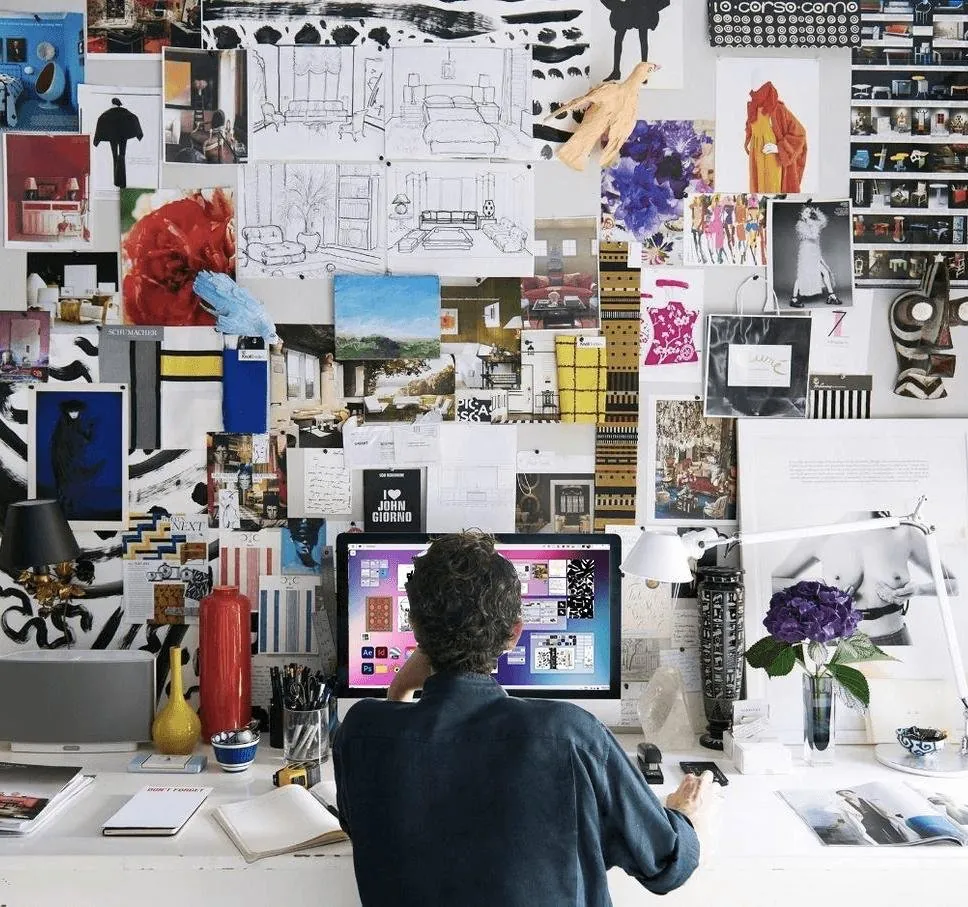
The biggest influence behind FileMap was not software at all. It was the whiteboards and pin-up walls of architecture and design schools and offices. Sketches, references and drafts go up on a wall or spread across a table. Everyone gets a bird's-eye view of the whole project at once. Conversations speed up. The room itself starts doing part of the thinking.
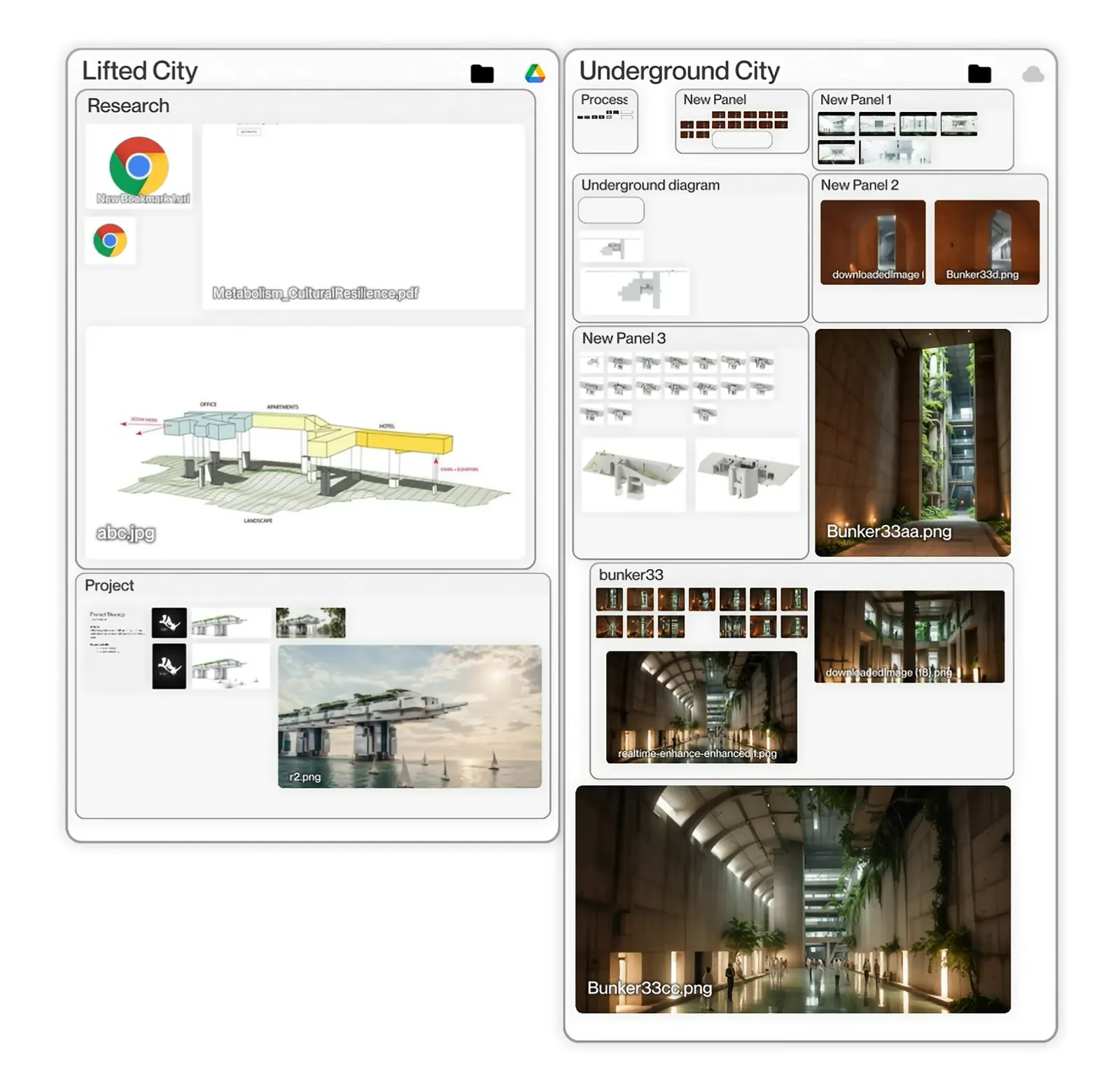
We wanted to carry that experience into digital file management. On Windows and Mac, files live in restrictive hierarchical trees: you tunnel into a folder and lose sight of everything else. FileMap replaces the tree with one zoomable, flexible visual plane where all your files and folders are visible together. People stop getting lost in folders. They work as if standing around a large table.
COGNITION
This is more than an aesthetic preference. Carl Jung emphasized the power of visual stimuli to create associations in the mind: images and symbols form meaningful connections well below conscious awareness. Daniel Kahneman's work on priming showed something adjacent. The visual cues around us direct thought and behavior without our noticing, accelerating some thoughts and tilting decisions.
FileMap leans on those faculties deliberately. Visual memory and spatial awareness are old, strong abilities, the same ones that let you remember where everything sits in a room you know well. When your work lives in space instead of in nested lists, those abilities carry part of the load, and the conscious mind is freed for the actual thinking.
NARRATIVE
When a person organizes their computer the way they organize a physical desk, something shifts. The desktop becomes an infinite, flexible space they see every time the machine opens. It can hold their goals, current projects, research, their most important files, photos, favorite tools, the books they are reading, the artworks and people who inspire them: everything occupying their mind right now. And because it is wired to the real file system, any format can join the story. Text, video, 3D models, all of it.
What you see reminds you and guides you, consciously and subconsciously. The layout is shaped by how you want to guide yourself, and it evolves as your goals change.
You shape the space, and the space shapes you back.
That cyclical narrative is FileMap's core difference from other storage tools. They hold your documents. This holds your direction.

SCENARIO
One of the scenarios we wrote while designing the product follows Maya, a third-year architecture student. She lays out her semester spatially: her design studio in the center as the main panel, supporting courses arranged around it, and a special zone where sustainability topics from two different courses overlap.
Two weeks in, small things start to compound. Her attention keeps returning to the sustainability zone because it is visually emphasized. While writing a history paper she spots connections to her studio project, simply because the materials sit near each other. Deadlines on a visible timeline lower her stress. In reviews she switches between sketches and research fast enough to keep the conversation moving.
Then comes the quiet realization: she is using the layout as a thinking tool. She places related ideas closer together and builds visual hierarchies that mirror her design priorities. When a professor mentions a concept, she remembers where her notes live visually, faster than she could ever recall a file name.
AGENTS
Most AI interfaces today are passive. They wait for you to ask. The agent we are building toward is different: a curious, analytical mentor that asks a question at the right moment, surfaces a tool you did not know existed, and helps a teacher express what they want the class to learn, then carries that intent to each student in their own context.
One scenario we work with: a student named Beliz adds a concept drawing to her space. The agent asks what she wants to do with it, then points her to an image-to-3D tool. Afterward it nudges her to record a one-minute video of the workflow and, with her permission, shares it with the class. Two classmates try the technique that same evening. Knowledge spreads sideways, student to student, and by the end of term the class has built a shared library of techniques.
The tool succeeds when a student can do something she could not do before, not when she spends more hours inside it.
That is the whole measure. I am deeply skeptical of engagement as a goal: time spent in an app tells you almost nothing about whether a person grew.
TRUST
A system like this can see a lot: layouts, file types, which tools people reach for. That is precisely why consent has to be structural rather than a checkbox. In our design, each user has a personal data vault and a personal agent. Workspace-level agents are fully separate from them. Permissions are asked for, and refreshed as things change, never assumed.
The whiteboard worked because everyone standing at it chose to be in the room. The digital version has to keep that property. A thinking space is only yours if you decide what enters it, who sees it, and what it remembers. Get that right, and the file system stops being a filing cabinet. It becomes what it was quietly waiting to become: a place to think.